

01Register
Every AI use case on one register, checked against the policy’s own in-scope criteria. AI proposes; a person decides.
Australian Government AI governance platform
One governance thread from use case to runtime.
The use case is the unit of accountability and the running AI system is the unit of control. Remit binds them end to end at the Operate Gate.
A safer, more trusted Australia through responsible AI.
Every AI use case on one register, checked against the policy’s own in-scope criteria. AI proposes; a person decides.
The DTA impact assessment, guided: official questions, guidance and risk matrix, with the agency’s evidence beside each answer.
Evidence-backed sign-off with conditions. Records lock at approval, and every later change is reasoned and audited.
Finds the agents, models and identities running on your platforms, read-only, and proposes the use case each serves.
A use case reaches Operate only once its approval, system, identities, region and controls stand. An unanswered check holds it.
Continuous at every stage: register integrity, platform risk and security signals, incidents to your service desk, the DTA register.
Appendix C, the DTA impact assessment and the register, in the DTA’s own words and formats. Nothing to configure.
Answers cite the agency’s own documents, so approvers see the proof before they sign.
Records checked against their evidence, and running agents against their platforms’ own risk and security signals.
Read-only connections to the cloud and AI platforms your agents run on, and incidents ticketed into your own service desk.
Australian Government AI governance platform
One governance thread from use case to runtime.
The use case is the unit of accountability and the running AI system is the unit of control. Remit binds them end to end at the Operate Gate.
Every AI use case on one register, checked against the policy’s own in-scope criteria. AI proposes; a person decides.
The DTA impact assessment, guided: official questions, guidance and risk matrix, with the agency’s evidence beside each answer.
Evidence-backed sign-off with conditions. Records lock at approval, and every later change is reasoned and audited.
Finds the agents, models and identities running on your platforms, read-only, and proposes the use case each serves.
A use case reaches Operate only once its approval, system, identities, region and controls stand. An unanswered check holds it.
Continuous at every stage: register integrity, platform risk and security signals, incidents to your service desk, the DTA register.
Appendix C, the DTA impact assessment and the register, in the DTA’s own words and formats. Nothing to configure.
Answers cite the agency’s own documents, so approvers see the proof before they sign.
Records checked against their evidence, and running agents against their platforms’ own risk and security signals.
Read-only connections to the cloud and AI platforms your agents run on, and incidents ticketed into your own service desk.
Product update · September 2026 · 1:58
Seven problems agencies meet with AI today, then the fourteen capabilities Remit brings to them, each shown on the product’s own screen from its demonstration agency. Built first for Australian Government agencies; going global next, with policy packs for each jurisdiction’s AI framework. We still have features to build, and we share each step as we go.
Why Remit
Model platforms run the AI, agent registries list it, GRC tools hold the approvals and service desks hold the incidents, so accountability breaks between approval and runtime. Remit keeps one governance record across all of them, built for the Australian Government policy from the first use case.
The policy scope check asks the policy’s own Appendix C sentences. The assessment is the DTA’s AI impact assessment tool, question for question. The register exports in the DTA’s own format. Nothing to configure before the first use case.
Answers cite the agency’s own documents. Approvers see the evidence behind every claim, and the register integrity check reads each record against its documents and says where they disagree.
Each approved use case is linked to the agents, models and identities running on your connected platforms, read-only, and its record holds at the Operate Gate until the evidence stands.
AI drafts, checks and cites, with every quote verified against its source and every call logged with its cost. It never rates a risk, approves, signs or sends anything to the DTA. Your people decide.
How it works
Every AI use case moves through the same seven stages, from the policy scope check to the running system, and every stage leaves evidence behind it. Assurance is not a stage: it runs across all seven.
Record the use case and run the policy scope check in the policy’s words. AI can propose the answers; a person records the decision.
The DTA impact assessment as a guided workflow: the threshold sections for every in-scope use case, the full assessment where risk demands it.
The approving officer signs off on the evidence, with conditions. The record locks and every later change carries a reason.
Record what implements the approved use case: the deployment, and the agents, models and identities Remit found running in it.
Remit’s own control. The use case waits here until its approval, running system, identities, region and control evidence all stand.
In operation and read on a schedule: register integrity, the platform’s own risk and security signals on each agent, incidents and reporting.
When the use case or what runs it changes, re-validation opens a new assessment version and the thread starts again, history kept.
Runtime control
Most AI governance stops at the approval. Remit reads what is actually running, read-only, and holds every use case to it: the agents, the models they call, the identities they run as, and what each platform itself reports about them.
Cloud resources, AI agents and model deployments, agent identities and agent registries, read through a published register of the only calls Remit may make on each platform.
A platform’s own tag proposes the use case an agent serves, and a person confirms it. One agent seen by two platforms is linked, never merged.
Five layers checked for each deployment: governance, architecture, identity and data, region, and assurance. A check nobody could answer holds the gate.
The platform’s own risk rating of each agent identity, and its security alerts and blocked actions on each agent. Kept as the platform’s, and never read as safe when nothing is reported.
Information Security Manual controls evaluated against what the platform reports, with an assessor register for what the evidence cannot show.
On demand, seven steps from the use case to the platform’s own reporting, each saying what it found, how long it took and what it cannot establish.
Cloud AI token use, the agency’s own cost export and AI seat licences, attributed to the use cases that spend them where the evidence allows.
No compliance percentage anywhere. A value Remit could not read is shown as not read, with the reason, never as a pass.
Solutions
Each role sees the register the way it needs to, and nobody can do what their role does not allow.
See the whole portfolio, what is awaiting sign-off, what is overdue and what has been reported to the DTA, and export the register when it is due.
Run the register, the integrity checks and the policy corpus; set who may do what; watch usage and cost of AI assistance.
Complete the DTA assessment with guidance beside every question, evidence cited beside each answer, and expert input on the questions that need it.
A read-only role that sees every record, every version and the append-only history, and changes nothing.
See every agent, model and identity running on your connected platforms, what each is linked to, and each platform’s own risk and security signals on it. Remit only reads.
AI incidents become tickets in the agency’s own ITSM system, with every update written back and the trail kept in Remit.
A public API and an MCP endpoint let agency systems and AI agents read the register and log incidents under an agency key, with the same audit as the screens.
Platform capabilities
From the first use case to the running agent and the DTA register, in one workspace. These are the product’s own screens, captured from real infrastructure running demonstration use cases.
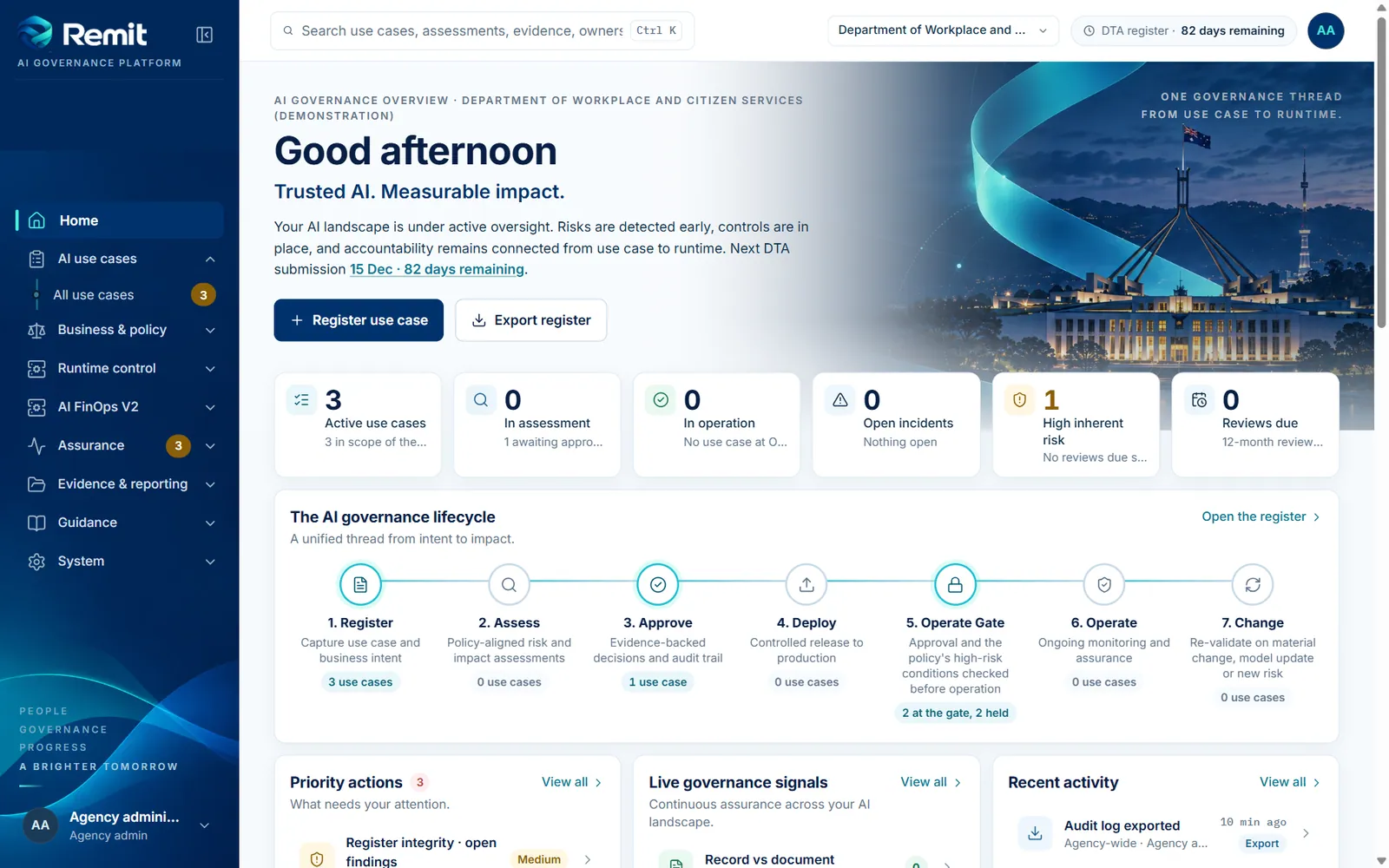
01 · Home
The whole portfolio on one screen: use cases at every stage, what is held at the Operate Gate, open incidents and findings, and what needs attention next.
Built for enterprise government environments
Trust and security
Government buyers ask hard questions. Remit answers them from the code as it stands, and says plainly what has not been done yet.
Read the security statement, how Remit uses AI and the accessibility statement.
Australian Government alignment
Remit is built around the Policy for the responsible use of AI in government v2.0 and its standards. The policy text is the DTA’s, reproduced under CC BY 4.0; the product is independent of the DTA.
| The policy asks for | In Remit |
|---|---|
| A policy scope check for every AI use case | The Appendix C in-scope criteria and the experimentation conditions, asked in the policy’s own words, with a documented scope decision on every record, in or out. |
| AI impact assessment for in-scope use cases | The DTA’s tool as a guided workflow: the threshold assessment (sections 1 to 4) for every in-scope use case, the full assessment (sections 5 to 12) where inherent risk demands it, exported as the DTA’s own Word template. |
| A register submitted to the DTA every six months | The register workbook in the DTA’s format, counted down on every overview, with scope decisions on their own sheet and the field definitions from the Standard for accountability. |
| Annual review of high-risk use cases | Review dates set at approval, re-validation that creates a new version, and the overview’s attention list when either is due. |
| Accountable official and governance reporting | Reports to the DTA, the governing body and the accountable official recorded as first-class sign-offs against each use case. |
| Transparency statement | Remit does not write your statement, but it gives you the facts for it: the register, the assessments, and a published statement of how Remit itself uses AI. |
| AI incidents | An incident log written to the policy’s own definition, with severities, statuses, outcomes and the ticket in your ICT incident system. |
Private preview coming soonTrusted AI. Stronger Australia.
Remit’s private preview opens soon for Australian Government agencies, with other jurisdictions to follow. Bring one high-value AI use case, and we’ll take it with you from the policy scope check to its running system.
Secure by design
Enterprise sign-on, tenancy on every query, an append-only audit log, and read-only connections to your platforms.
From policy to runtime
The policy, the assessment and the register in the DTA’s own words, bound to the systems that actually run.
Evidence on every decision
Answers cite the agency’s own documents, the running system is read rather than assumed, and a person decides.
Contact: send us a message